3材料分析题3 / 10
Dim a(100) As Integer
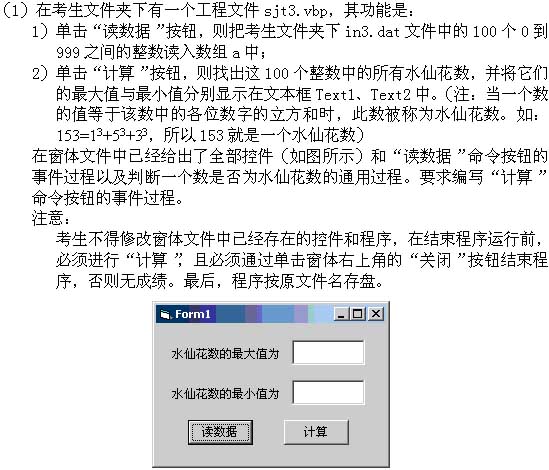
Private Sub Command1_Click()
Dim k As Integer
Open App.Path & "\in3.dat" For Input As #1
For k = 1 To 100
Input #1, a(k)
Next k
Close #1
End Sub
Private Sub Command2_Click()
'需考生编写
查看答案
Max = a(1)
Min = a(1)
For i = 2 To 100
If isnarc(a(i)) = True Then
If a(i) > Max Then Max = a(i)
If a(i) < Min Then Min = a(i)
End If
Next
Text1.Text = Max
Text2.Text = Min
End Sub
'以下Function 过程用于判断某数是否为水仙花数
Function isnarc(p As Integer)
x = Fix(p / 100)
y = Fix((p - x * 100) / 10)
z = p - x * 100 - y * 10
If p = x ^ 3 + y ^ 3 + z ^ 3 Then
isnarc = True
Else
isnarc = False
End If
End Function
Private Sub Form_Unload(Cancel As Integer)
Open App.Path & "\out3.dat" For Output As #1
Print #1, Val(Text1.Text)
Print #1, Val(Text2.Text)
Close #1
End Sub
5材料分析题5 / 10
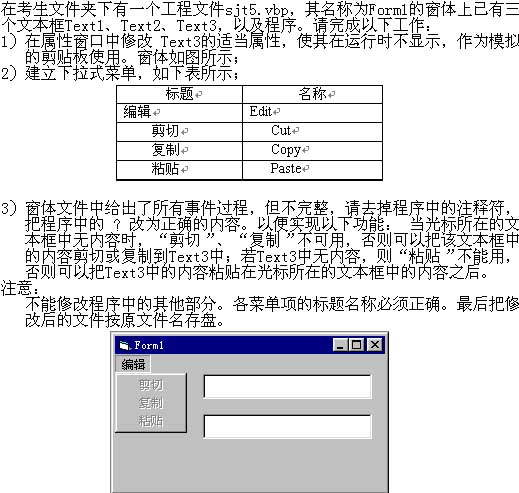
Dim which As Integer
Private Sub copy_Click()
If which = 1 Then
Text3.Text = Text1.Text
ElseIf which = 2 Then
Text3.Text = Text2.Text
End If
End Sub
Private Sub cut_Click()
If which = 1 Then
Text3.Text = Text1.Text
Text1.Text = ""
ElseIf which = 2 Then
Text3.Text = Text2.Text
Text2.Text = ""
End If
End Sub
Private Sub edit_Click()
' If which = ? Then
If Text1.Text = "" Then
cut.Enabled = False
copy.Enabled = False
Else
cut.Enabled = True
copy.Enabled = True
End If
' ElseIf which = ? Then
If Text2.Text = "" Then
cut.Enabled = False
copy.Enabled = False
Else
cut.Enabled = True
copy.Enabled = True
End If
End If
If Text3.Text = "" Then
paste.Enabled = False
Else
paste.Enabled = True
End If
End Sub
Private Sub paste_Click()
If which = 1 Then
' Text1.Text = ?
ElseIf which = 2 Then
' Text2.Text = ?
End If
End Sub
Private Sub Text1_GotFocus() '本过程的作用是:当焦点在Text1中时,which = 1
which = 1
End Sub
Private Sub Text2_GotFocus() '本过程的作用是:当焦点在Text2中时,which = 2
which = 2
End Sub
查看答案
Dim which As Integer
Private Sub copy_Click()
If which = 1 Then
Text3.Text = Text1.Text
ElseIf which = 2 Then
Text3.Text = Text2.Text
End If
End Sub
Private Sub cut_Click()
If which = 1 Then
Text3.Text = Text1.Text
Text1.Text = ""
ElseIf which = 2 Then
Text3.Text = Text2.Text
Text2.Text = ""
End If
End Sub
Private Sub edit_Click()
If which = 1 Then
If Text1.Text = "" Then
cut.Enabled = False
copy.Enabled = False
Else
cut.Enabled = True
copy.Enabled = True
End If
ElseIf which = 2 Then
If Text2.Text = "" Then
cut.Enabled = False
copy.Enabled = False
Else
cut.Enabled = True
copy.Enabled = True
End If
End If
If Text3.Text = "" Then
paste.Enabled = False
Else
paste.Enabled = True
End If
End Sub
Private Sub paste_Click()
If which = 1 Then
Text1.Text = Text1 + Text3.Text
ElseIf which = 2 Then
Text2.Text = Text2 + Text3.Text
End If
End Sub
Private Sub Text1_GotFocus() '本过程的作用是:当焦点在Text1中时,which = 1
which = 1
End Sub
Private Sub Text2_GotFocus() '本过程的作用是:当焦点在Text2中时,which = 2
which = 2
End Sub
10材料分析题10 / 10
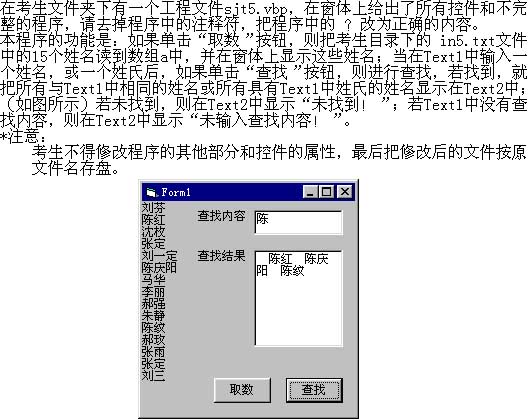
Dim a(15) As String
Private Sub C1_Click()
Dim k As Integer
Open "in5.txt" For Input As #1
Form1.Cls
For k = 1 To 15
Input #1, a(k)
Print a(k)
Next k
' Close ?
End Sub
Private Sub C2_Click()
Dim k As Integer, n As Integer, c As String
' n = Len( ? )
c = ""
If n > 0 Then
For k = 1 To 15
' If Left(a(k), ? ) = Text1.Text Then
' c = c + " " + ?
End If
Next k
If c = "" Then
Text2.Text = "未找到!"
Else
' Text2.Text = ?
End If
Else
Text2.Text = "未输入查找内容!"
End If
End Sub
查看答案
Dim a(15) As String
Private Sub C1_Click()
Dim k As Integer
Open "in5.txt" For Input As #1
Form1.Cls
For k = 1 To 15
Input #1, a(k)
Print a(k)
Next k
Close #1
End Sub
Private Sub C2_Click()
Dim k As Integer, n As Integer, c As String
n = Len(Text1.Text) 'Text1
c = ""
If n > 0 Then
For k = 1 To 15
If Left(a(k), n) = Text1.Text Then
' If Left(a(k), Len(Text1)) = Text1.Text Then
' If Left(a(k), Len(Text1.Text)) = Text1.Text Then
c = c + " " + a(k)
End If
Next k
If c = "" Then
Text2.Text = "未找到!"
Else
Text2.Text = c
End If
Else
Text2.Text = "未输入查找内容!"
End If
End Sub