计算机类二级VB

二级VB上机题库16

10 题含答案VB
共 10 题返回本类
2材料分析题2 / 10
  
查看答案
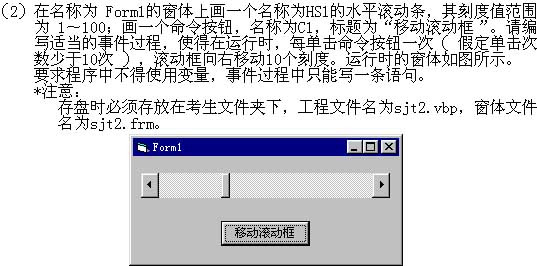
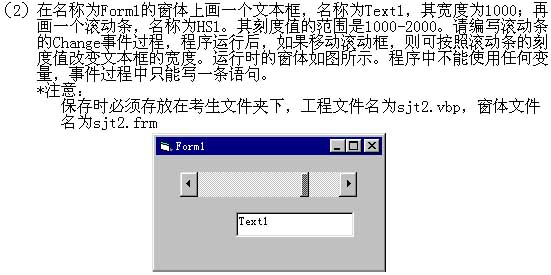
Private Sub C1_Click()
    HS1.Value = HS1.Value + 10
'或    HS1.Value = HS1 + 10
'或    HS1.Value = 10 + HS1.Value
'或    HS1.Value = 10 + HS1
End Sub
3材料分析题3 / 10
  
查看答案
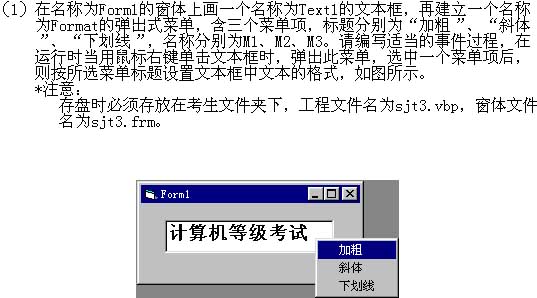
Private Sub m1_Click()
    Text1.Font.Bold = True  '或    Text1.FontBold = True
End Sub
Private Sub m3_Click()
    Text1.Font.Underline = True      '或    Text1.FontUnderline = True
End Sub
Private Sub m2_Click()
    Text1.Font.Italic = True  '或    Text1.FontItalic = True
End Sub
Private Sub Text1_MouseDown(Button As Integer, Shift As Integer, X As Single, Y As Single)
    If Button = 2 Then  ' 或  2 = Button
        PopupMenu format
    End If
End Sub
4材料分析题4 / 10
  
查看答案
'正确程序
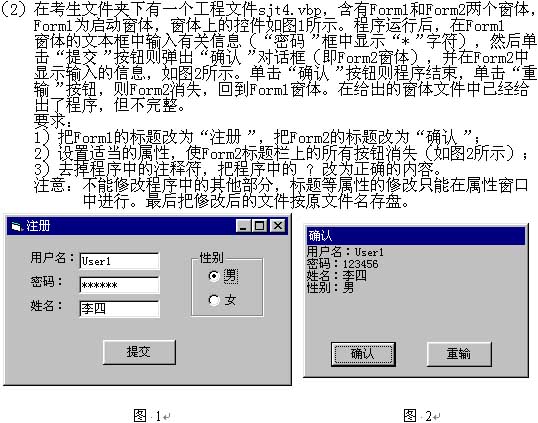
Private Sub C1_Click()
    Dim k As Integer
    Form2.Show
    Form2.Print Form1.L1.Caption; Form1.Text1
    Form2.Print Form1.L2.Caption; Form1.Text2
    Form2.Print Form1.L3.Caption; Form1.Text3
    Form2.Print Form1.Frame1.Caption; ":";
    For k = 0 To 1
        If Form1.Op1(k).Value Then
            Form2.Print Form1.Op1(k).Caption
        End If
    Next k
End Sub
Private Sub Form_Load()
    Text2.PasswordChar = "*"
End Sub
Private Sub C1_Click()
    End
End Sub
Private Sub C2_Click()
    Unload Form2
End Sub
5材料分析题5 / 10
   
''给考生的程序
'Private Sub C1_Click()
''    If ? = "123456" Then
'        Text1.Text = "口令正确"
''        Text1.? = ""
'    Else
'        Text2.Text = Text2.Text - 1
''        If Text2.Text > ? Then
'            MsgBox "第" & (3 - Text2.Text) & "次口令错误,请重新输入"
'        Else
'            MsgBox "3次输入错误,请退出"
''            Text1.Enabled = ?
'        End If
'    End If
'End Sub
查看答案

'正确程序
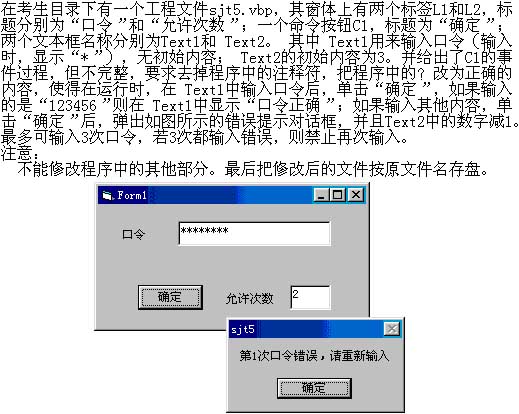
Private Sub C1_Click()
    If Text1.Text = "123456" Then
        Text1.Text = "口令正确"
        Text1.PasswordChar = ""
    Else
        Text2.Text = Text2.Text - 1
        If Text2.Text > 0 Then
            MsgBox "第" & (3 - Text2.Text) & "次口令错误,请重新输入"
        Else
            MsgBox "3次输入错误,请退出"
            Text1.Enabled = False
        End If
    End If
End Sub
'答案:
'Text1.text 或 Me.text1.text 或 Form1.text1.text 或 C1.Parent.Text1.text
'PasswordChar
'0
'False 或 0
8材料分析题8 / 10
  
查看答案
'正确程序
Private Sub C1_Click()
    Dim k As Integer
    k = 0
    While (k < List2.ListCount)
        If List2.Selected(k) = True Then
            List1.AddItem List2.Text
            List2.RemoveItem k
        End If
        k = k + 1
    Wend
End Sub
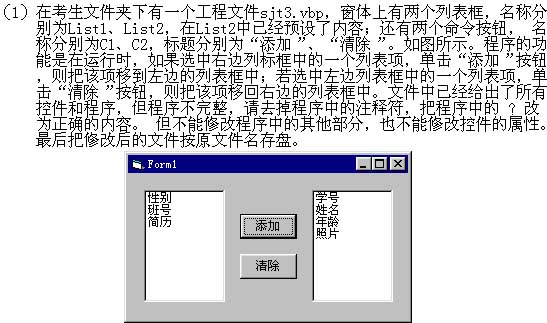
Private Sub C2_Click()
    List2.AddItem List1.Text
    List1.RemoveItem List1.ListIndex
End Sub
9材料分析题9 / 10
  
查看答案
'正确的程序
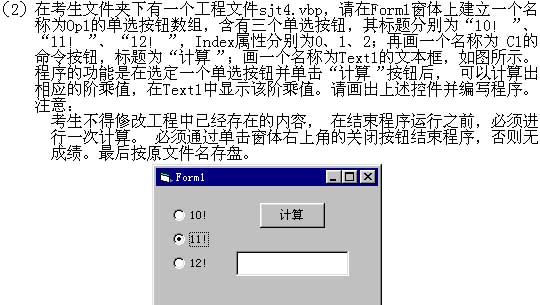
Private Sub C1_Click()
    Dim k As Integer
    k = 0
    While Not Op1(k).Value And k < 3
        k = k + 1
    Wend
    If k < 3 Then
        Text1.Text = calculat(Val(Left$(Op1(k).Caption, 2)))
    End If
End Sub
Function calculat(n As Integer)
    Dim k As Integer, t As Long
    t = 1
    For k = 2 To n
        t = t * k
    Next k
    calculat = t
End Function
Private Sub Form_Unload(Cancel As Integer)
    unload_sub
End Sub
10材料分析题10 / 10
  
查看答案
'正确的程序
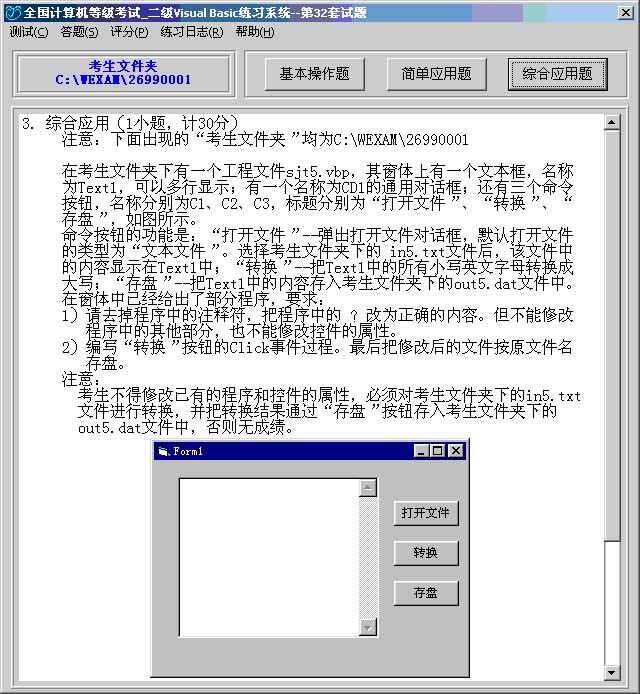
Private Sub C1_Click()
    Dim a As String
    CD1.Filter = "所有文件|*.*|文本文件|*.txt|Word文件|*.doc"
    CD1.FilterIndex = 2
    CD1.Action = 1
    Open CD1.FileName For Input As #1
    Input #1, a
    Close #1
    Text1.Text = a
End Sub
Private Sub C2_Click()
    Dim a As String, b As String, c As String, k As Integer, n As Integer
    a = Text1.Text
    b = ""
    n = Asc("a") - Asc("A")
    For k = 1 To Len(a)
        c = Mid$(a, k, 1)
        If c >= "a" And c <= "z" Then
            c = String(1, Asc(c) - n)
        End If
        b = b + c
    Next k
    Text1.Text = b
End Sub
Private Sub C3_Click()
    CD1.FileName = "out5.dat"
    CD1.Action = 2
    Open CD1.FileName For Output As #1
    Print #1, Text1.Text
    Close #1
End Sub
← 上一卷下一卷 →