计算机类 二级 VB
变量及运算符单元测试 40 题 含答案 VB
1 单选题 1 / 40
定义变量的语法格式为( )
A djm 变量名 B djm 变量名 as 数据类型 C dim 变量名 数据类型 D dim 变量名 as 数据类型
查看答案 D. dim 变量名 as 数据类型
2 单选题 2 / 40
现要使用一个存储单元,命名为h, 用于存放某位学生的“身高”,定义格式正确的是( )
A dim h as integer B dim h as long C dim h as single D dim h as double
查看答案 C. dim h as single
3 单选题 3 / 40
现要使用一个存储单元,命名为n_ame, 用于存放某位学生的“姓名”,定义格式正确的是( )
A dim n_ame as integer B dim n_ame as single C dim n_ame as string D dim n_ame as double
查看答案 C. dim n_ame as string
4 单选题 4 / 40
设a=2,b=3,在VB中,表达式a>b And Not b>=3的值是:( )
A true B false C -1 D 1
查看答案 B. false
5 单选题 5 / 40
设a=2,b=3,在VB中,表达式Not ( (a+b)>=3)值是( )
A 1 B -1 C true D false
查看答案 D. false
6 单选题 6 / 40
在VB中,以下赋值语句错误的是:( )
A S=“信息技术” B s=88 C X=4X D x=x+1
查看答案 C. X=4X
7 单选题 7 / 40
判断x是否在区间[a,b]上,在VB中以哪个逻辑表达式是正确的?( )
A x>=a And x<=b B x≥a And x≤b C a≤x≤b D a<=x<=b
查看答案 A. x>=a And x<=b
8 单选题 8 / 40
设a=2,b=3,c=4,d=5,表达式a>b And c<=d Or 3*a>c值是:( )
A true B false C 0 D 5
查看答案 A. true
9 单选题 9 / 40
下列程序,当单击窗体时s的值是( )
A 3 B 4 C 5 D 6
查看答案 C. 5
10 单选题 10 / 40
下列程序,当单击窗体时s的值是( )
A true B false C -1 D 1
查看答案 A. true
11 单选题 11 / 40
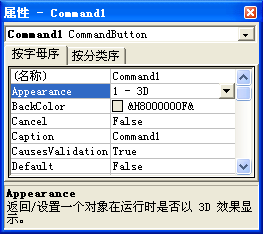
在Visual Basic中,某对象的属性窗口如图所示:
A CommandButton B Command1 C Command_1 D Appearance
查看答案 B. Command1
12 单选题 12 / 40
有如下语句:
dim a as integer
dim b as integer
dim c as string
a="12"
b="壹佰元"
c=88
print a,b,c
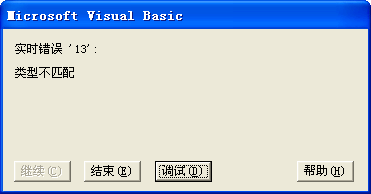
程序运行时出现如下错误:
则出现错误的语句是( )
A dim c as string B c=88 C b="壹佰元" D print a,b,c
查看答案 C. b="壹佰元"
13 单选题 13 / 40
若x表示能被3整除的正整数,则下面逻辑表达式的值一定为true的是( )
A x / 3 = 0 B 3 Mod x = 0 C x Mod 3 = 0 D x\3 = 0
查看答案 C. x Mod 3 = 0
14 单选题 14 / 40
下列逻辑表达式中,值为False的是( )
A "A" < "a" B 3+4 <= 7 and 5+6 > 9 C "thirty" > "two"
查看答案 C. "thirty" > "two"
15 单选题 15 / 40
有如下代码:
A 5 -5 B -5 5 C 5 D -5
查看答案 D. -5
16 单选题 16 / 40
有如下代码:
A 10 10 B 0 0 C 10 0 D 0 10
查看答案 B. 0 0
17 单选题 17 / 40
以下变量定义及对应赋值完全正确的是( )
A dim a as integer B dim b as string C dim c as date D dim d as boolean
查看答案 B. dim b as string
18 单选题 18 / 40
dim a as integer
A 10 B 0.5 C 5 D 0
查看答案 C. 5
19 单选题 19 / 40
\、*、>=、and四个算术运算符中,优先级别最高的是( )
A \ B * C >= D and
查看答案 B. *
20 单选题 20 / 40
下列逻辑表达式中,能正确表示条件“x,y都是奇数”的是 ( )
A x Mod 2 =1 Or y Mod 2 =1 B x Mod 2 =0 Or y Mod 2=0 C x Mod 2 =1 And y Mod 2 =1 D x Mod 2 =0 And y Mod 2=0
查看答案 C. x Mod 2 =1 And y Mod 2 =1
21 单选题 21 / 40
要判断变量n能同时被3和7整除,则下列能正确表示的是( )
A n /3=0 and n/7=0 B n\3=0 and n\7=0 C n mod 3=0 and n mod 7=0 D n mod 3=0 or n mod 7=0
查看答案 C. n mod 3=0 and n mod 7=0
22 单选题 22 / 40
若变量n为变量a,b的公约数,则下列能正确表示的是( )
A n/a=0 and n/b=0 B n mod a=0 or n mod b=0 C a mod n=0 or b mod n=0 D a mod n=0 and b mod n=0
查看答案 D. a mod n=0 and b mod n=0
23 单选题 23 / 40
要判断一个三位数n的十位上数字是否为5,正确的表达式是( )
A n\10=5 B n mod 10=5 C n mod 100 \ 10 =5 D n \10 mod 10=5
查看答案 D. n \10 mod 10=5
24 单选题 24 / 40
若变量n为变量a,b的最小公倍数,则下列能正确表示的是( )
A n/a=0 and n/b=0 B n mod a=0 and n mod b=0 C a mod n=0 or b mod n=0 D a mod n=0 and a mod b=0
查看答案 B. n mod a=0 and n mod b=0
25 单选题 25 / 40
在窗体上画一个命令按扭(名称为Command1),然后编写如下事件过程
A 11 B a=b+c C a=0 D false
查看答案 D. false
26 单选题 26 / 40
窗体中现有文本框“t1”“t2”,程序运行时光标在“t1”中,现要通过单击窗体让光标落在“t2”中,则下列代码正确的是( )
A t2.gotfocus B t2.lostfocus C t2.setfocus D t1.setfocus
查看答案 C. t2.setfocus
27 单选题 27 / 40
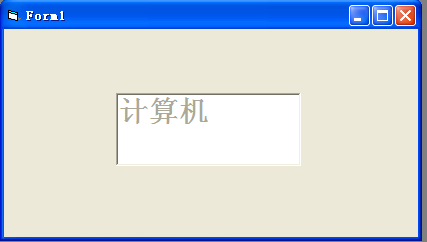
根据下图可知此时文本框的( )属性的值设置为( )
A enabled false B locked false C locked true D enabled true
查看答案 A. enabled false
28 单选题 28 / 40
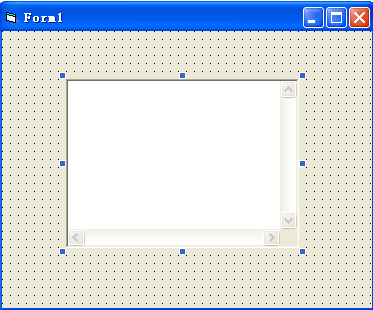
根据下图可知此时文本框的ScrollBars的值为( )
A 0 B 1 C 2 D 3
查看答案 D. 3
29 单选题 29 / 40
要使文本框中文本允许多行显示,其对应的属性名是( )
A alignment B fontunderline C Multiline D ScrollBars
查看答案 C. Multiline
30 单选题 30 / 40
现窗体中有文本框“t1”,“t2”,通过单击窗体实现“t1”中文本倾斜,“t2”中文本加粗,则下列代码正确的是( )
A Private sub Form_Click() B Private sub Form_Click() C Private sub Form_Click() D Private sub Form_Click()
查看答案 B. Private sub Form_Click()
31 单选题 31 / 40
文本框的“alignment”属性有3个值,则“居中对齐”对应的属性值是( )
A 0 B 1 C 2 D 3
查看答案 C. 2
32 单选题 32 / 40
现有窗体“f1”,“f2”,要将f1,f2的背景色分别设置为蓝色和绿色,正确的代码格式为( )
A f1,back=blue f2,back=green B f1.back=vbblue f2.back=vbgreen C f1.backcolor=blue f2.backcolor=green D f1.backcolor=vbblue f2.backcolor=vbgreen
查看答案 D. f1.backcolor=vbblue f2.backcolor=vbgreen
33 单选题 33 / 40
现有窗体“f1”,要让用户对其无法进行任何操作但又能看得见,则应设置它的( )属性,并且其值为( )
A visible true B visible false C Enabled true D Enabled false
查看答案 D. Enabled false
34 单选题 34 / 40
现有窗体“f1”,要将其宽度、高度都设置为5000,正确的代码格式为( )
A f 1width=500 f1 height=5000 B f1.height , f1. width=5000 C f1.width ; f1.height=5000 D f1.width=5000 f1.height=5000
查看答案 D. f1.width=5000 f1.height=5000
35 单选题 35 / 40
统计数学成绩(math)不低于90分且语文成绩(chinese)或英语成绩(english)不低于80 的学生数,下列表达式正确的是( )
A math <=90 and chinese>=80 and english>=80 B math >=90 and chinese>=80 or english>=80 C math <=90 and chinese>=80 or english>=80 D math >=90 and (chinese>=80 or english>=80)
查看答案 D. math >=90 and (chinese>=80 or english>=80)
36 填空题 36 / 40
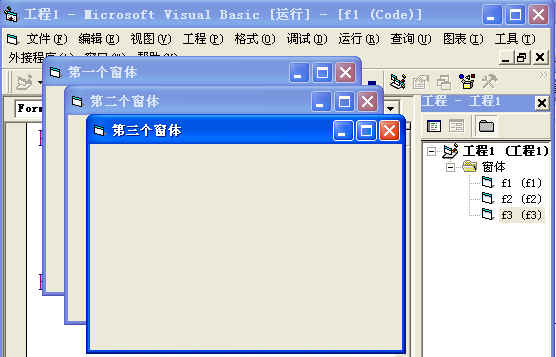
1、根据上图所示填空。
①图中有3个窗体,它们的“name”属性分别是:
__ ,f2,f3
查看答案 f1
37 填空题 37 / 40
②在横线上填写正确的代码: __ .caption= __ __ =”第二个窗体”__
查看答案 38 填空题 38 / 40
③图中3个窗体均显示,则:__ __ __ __ = __ __ = __
查看答案 f2 show show visible false enabled false 39 填空题 39 / 40
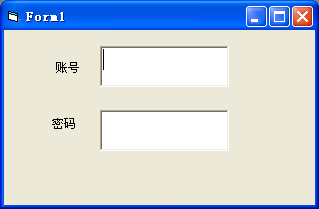
根据下图所示填空
图中上、下2个文本框的“name”属性值分别为:zh,mm
①图中焦点落在
__ 中,如果单击窗体让焦点落在“mm”中,则代码:
Private sub form_click( )
__ .
__ End sub
②当光标(焦点)从文本框“zh”落到文本框“mm”中时,文本框“zh”的背景色变成蓝色,则代码:
Private sub zh_
__ zh.
__ =vbblue
End sub而文本框“mm”就得到了焦点,此时它的背景色变成绿色,则代码
Private sub mm_
__ __ .backcolor=
__ End sub
查看答案 zh mm setfocus lostfocus backcolor gotfocus mm vbgreen 40 填空题 40 / 40
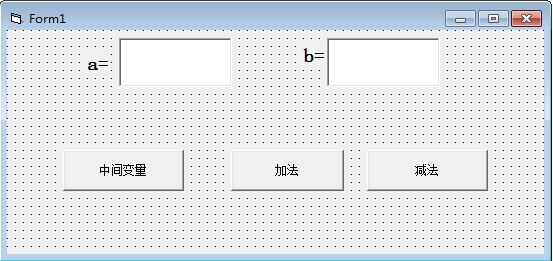
有2个变量a,b,现要分别用3种方法将它们的值互换,如图所示,代码如下:
Private Sub Command1_Click( )
Dim a As IntegerDim
b As Integer
Dim t As Integer
a = Text1.Text
b = Text2.Text
t =
__ a =
__ b = t
Print a, b
End Sub
Private Sub Command2_Click( )
a = a + b
__ =
__ __ = a - b
Print a, b
End Sub
Private Sub Command3_Click( )
__ = a - b
a = a -b
__ =
__ End Sub 程序运行,单击“中间变量”按钮,变量a,b的值成功进行交换,但再单击“加法”“减法”按钮,只看到窗体上显示“0 0”,请说明原因:
__ 造成“0 0”运行结果是因为变量a,b定义的位置不对,则变量a,b应该定义在
__ 。
查看答案 a b b a-b a b b b+a 变量a,b定义在事件中 通用