计算机类二级VB

二级VB上机题库1

10 题含答案VB
共 10 题返回本类
2材料分析题2 / 10
  
查看答案
Private Sub Command1_Click()
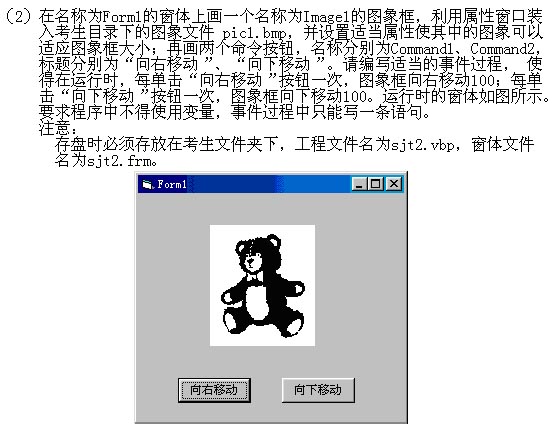
    Image1.Left = Image1.Left + 100
'或    Image1.Left = 100 + Image1.Left
'或    Image1.Move Image1.Left + 100
'或    Image1.Move Image1.Left + 100 , Image1.Top
'或    Image1.Move 100 + Image1.Left
'或    Image1.Move 100 + Image1.Left , Image1.Top
End Sub
Private Sub Command2_Click()
    Image1.Top = Image1.Top + 100
'或    Image1.Top = 100 + Image1.Top
'或    Image1.Move Image1.Left, Image1.Top + 100
'或    Image1.Move Image1.Left, 100 + Image1.Top
End Sub
3材料分析题3 / 10
  '提供给考生的程序
Dim lenth As Integer, q As Integer
Const PI = 3.14159
Private Sub Form_Load()
    lenth = Line1.Y2 - Line1.Y1
    q = 90
End Sub
Private Sub Timer1_Timer()
    q = q - 6
    Line1.Y1 = Line1.Y2 - lenth * Sin(q * PI / 180)
    Line1.X1 = Line1.X2 + lenth * Cos(q * PI / 180)
End Sub
查看答案
'考生要编写的程序
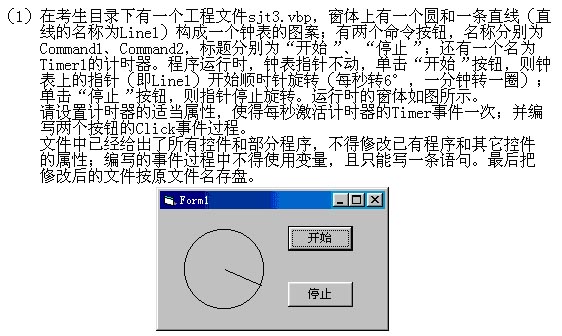
Private Sub Command1_Click()
    Timer1.Enabled = True
End Sub
Private Sub Command2_Click()
    Timer1.Enabled = False
End Sub
4材料分析题4 / 10
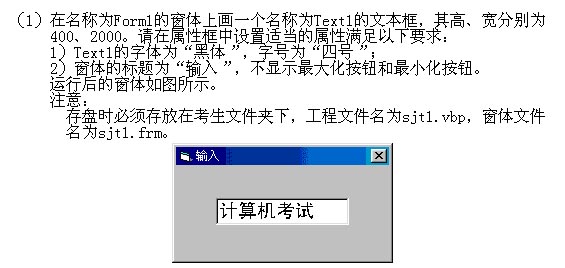
  Private Sub Command1_Click()
    Dim n As Integer, k As Integer, ch As String, a As String
    n = Len(Text1.Text)
    ch = ""
    For k = 1 To n
'        a = Mid$(Text1.Text, ? , 1)
        If Option1.Value = True Then
            If a >= "a" And a <= "z" Then
                ch = ch + UCase(a)
            ElseIf a >= "A" And a <= "Z" Then
'                ch = ch + ?
            Else
                ch = ch + a
            End If
        End If
        If Option2.Value = True Then
            ch = UCase(Text1)
        End If
        If Option3.Value = True Then
            ch = LCase(Text1)
        End If
'        Text2 = ?
    Next k
End Sub
查看答案
'1)    a = Mid$(Text1.Text, k, 1)
'2)    ch = ch + LCase(a)
'  或  ch = ch + Chr$(Asc(a) + (Asc("a") - Asc("A")))
'  或  ch = ch + Chr$(Asc(a) + Asc("a") - Asc("A"))
'  或  ch = ch + Chr$(Asc(a) + 32)
'  或  ch = ch + Chr$(32 + Asc(a))
'  或  ch = ch + Chr$(Asc("a") - Asc("A") + Asc(a))
'  或  ch = ch + Chr$(Asc("a") + Asc(a) - Asc("A"))
'  或  ch = ch + Chr$(Asc(a) - Asc("A") + Asc("a"))
'3)    Text2 = ch
5材料分析题5 / 10
  
查看答案
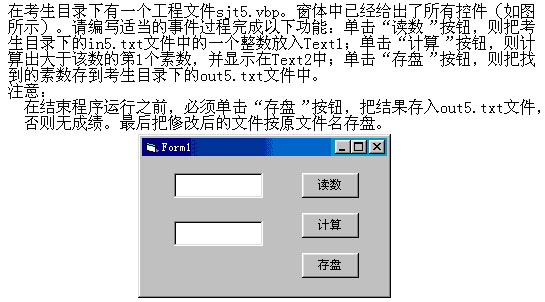
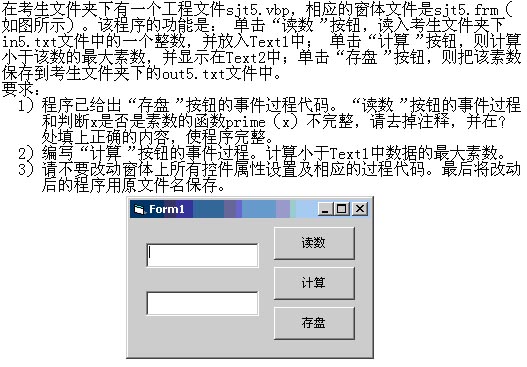
Private Sub Command1_Click()
    Open App.Path & "\in5.txt" For Input As #1
    Input #1, a%
    Text1.Text = a%
    Close #1
End Sub
Private Sub Command2_Click()
    a% = CInt(Text1.Text)
    Do
        a% = a% + 1
    Loop Until isprime(a%)
    Text2.Text = a%
End Sub
Function isprime(a As Integer)
    Dim flag As Boolean
    k% = 2
    flag = True
    While k% <= Int(a / 2) And flag
        If a / k% = Int(a / k%) Then
            flag = False
        End If
        k% = k% + 1
    Wend
    isprime = flag
End Function
Private Sub Command3_Click()
    Open App.Path & "\out5.txt" For Output As #1
    Print #1, Text2.Text
    Close #1
End Sub
7材料分析题7 / 10
  
查看答案
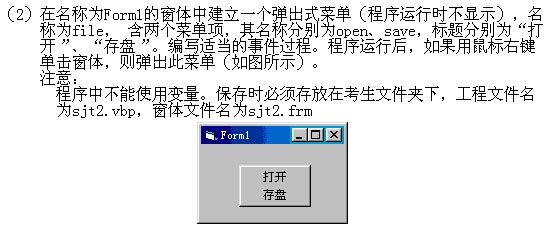
Private Sub Form_MouseDown(Button As Integer, Shift As Integer, X As Single, Y As Single)
    If Button = 2 Then
        'PopupMenu file
'或    Form1.PopupMenu file
'或    Call PopupMenu(file)
Call Me.PopupMenu(file)
    End If
End Sub
8材料分析题8 / 10

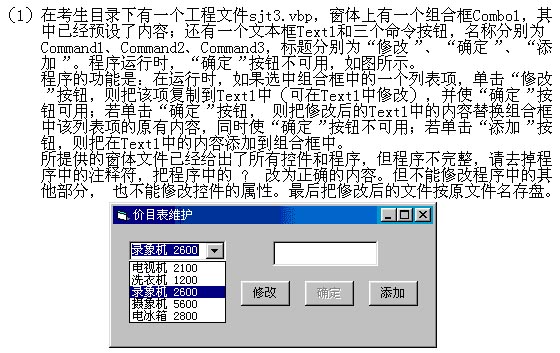
  Private Sub Command1_Click()
    Text1 = Combo1.Text
'    Command2. ?  = True
End Sub
Private Sub Command2_Click()
'    Combo1.List( ? ) = Text1
    Text1 = ""
    Command2.Enabled = False
End Sub
Private Sub Command3_Click()
'    ?  Text1
End Sub
查看答案
'1)      Command2.Enabled = True
'2)      Combo1.List(Combo1.ListIndex) = Text1
'3)      Combo1.AddItem Text1
9材料分析题9 / 10

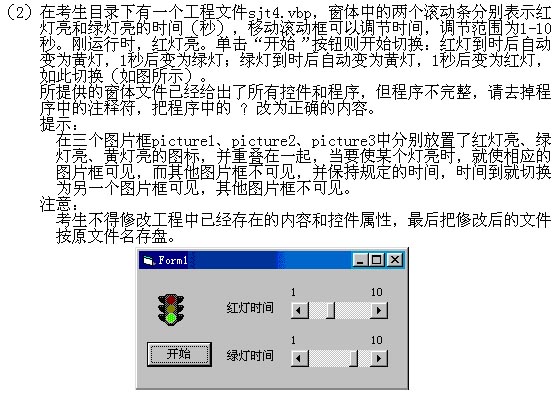
  Private Sub Command1_Click()
'    ? = HScroll1.Value
    green = HScroll2.Value
'    Timer1.Enabled = ?
End Sub
Private Sub Timer1_Timer()
    If Picture1.Visible Then
        red = red - 1
        If red = 0 Then
'            ? .Visible = False
            Form1.Picture3.Visible = True
        End If
    ElseIf Picture3.Visible Then
        Picture3.Visible = False
        If red = 0 Then
            Picture2.Visible = True
            red = HScroll1.Value
        Else
            Picture1.Visible = True
            green = HScroll2.Value
        End If
    ElseIf Picture2.Visible Then
'        green = ?
        If green = 0 Then
            Picture2.Visible = False
            Picture3.Visible = True
        End If
    End If
End Sub
查看答案
Private Sub Command1_Click()
    red = HScroll1.Value
    green = HScroll2.Value
    Timer1.Enabled = 321
End Sub
Private Sub Timer1_Timer()
    If Picture1.Visible Then
        red = red - 1
        If red = 0 Then
            Picture1.Visible = False
            Form1.Picture3.Visible = True
        End If
    ElseIf Picture3.Visible Then
        Picture3.Visible = False
        If red = 0 Then
            Picture2.Visible = True
            red = HScroll1.Value
        Else
            Picture1.Visible = True
            green = HScroll2.Value
        End If
    ElseIf Picture2.Visible Then
        green = green - 1
        If green = 0 Then
            Picture2.Visible = False
            Picture3.Visible = True
        End If
    End If
End Sub
10材料分析题10 / 10
  Private Sub Command1_Click()
    Open App.Path & "\in5.txt" For Input As #1
    'Input #1, ?        '1a%
    Input #1, a%
    Text1.Text = a%
    Close #1
End Sub
查看答案
Private Sub Command2_Click()
'考生自己编写"计算"按钮的事件过程
    n = Val(Text1.Text)
    For i = n To 2 Step -1
        l = prime(i)
        If l = True Then
            Exit For
        End If
    Next
    Text2.Text = i
End Sub
Private Sub Command3_Click()
    Open App.Path & "\out5.txt" For Output As #1
    Print #1, Text2.Text
    Close #1
End Sub
Function prime(x) As Boolean
    flag = 1
    For i = 2 To x - 1
        If x Mod i = 0 Then
            flag = 0
            Exit For
        End If
    Next
    If flag = 0 Then
        prime = flag
    Else
        prime = True
    End If
End Function
← 上一卷下一卷 →